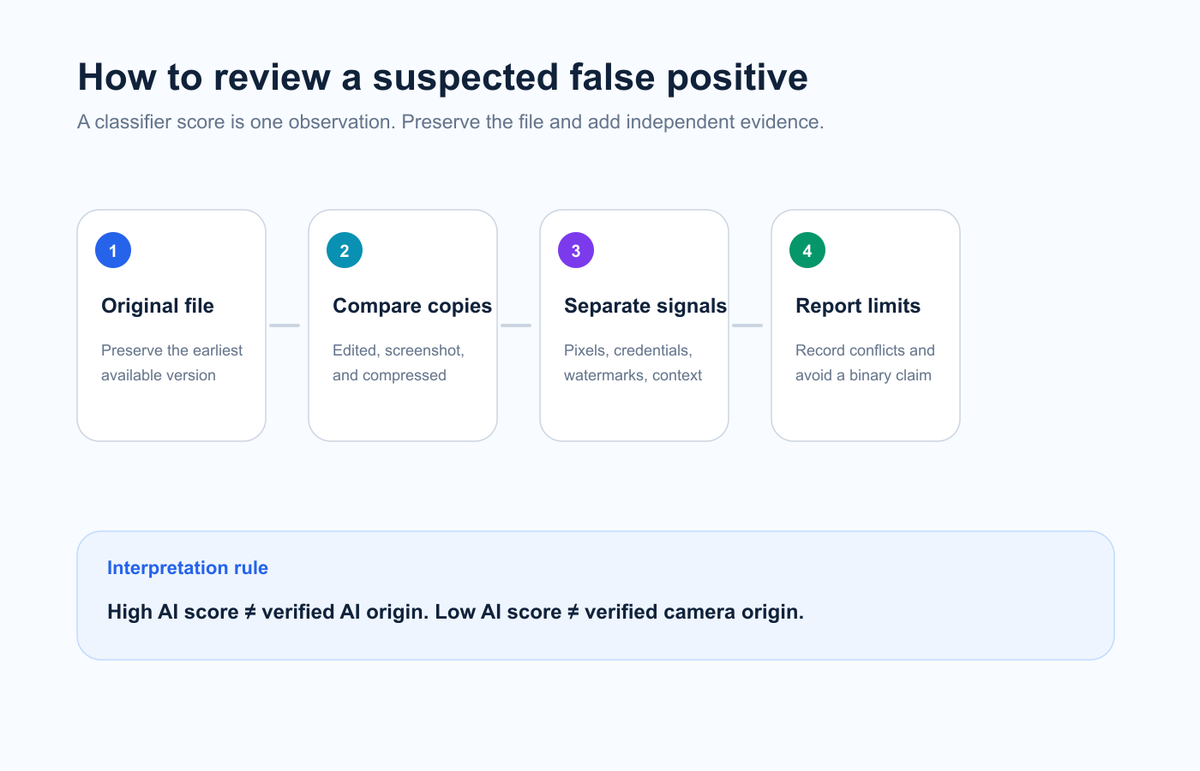
An AI probability score is a model estimate, not a verified creation history.
Normal editing and compression can change the features a detector reads.
A valid C2PA credential or provider watermark answers a different question from pixel classification.
Retest the original file, compare versions, and trace the earliest source before making a high-stakes decision.
EasyGlobe Team
Global Growth Team
EasyGlobe helps teams expand into global markets with practical SEO, localization, LLM optimization, paid advertising, and growth operations. We turn complex international growth work into clear systems, high-quality content, and measurable execution.
An AI image detector can flag a real photo because it estimates patterns in pixels; it does not observe how the photo was created. Heavy denoising, portrait retouching, synthetic blur, upscaling, screenshots, and repeated compression can make a camera photo resemble patterns seen in generated images. A high score is a reason to investigate, not proof that the image is AI-generated.
Start with the best available file in the AI Image Detector, but preserve the original and compare several evidence layers before reaching a conclusion.
What is an AI image detector false positive?
A false positive happens when a detector labels a human-made or camera-captured image as AI-generated. The model may be reacting to a combination of texture, noise, edges, color transitions, or other statistical features that overlap with its training examples.
This is different from provenance verification. A classifier estimates which class best matches the pixels. A C2PA Checker inspects signed Content Credentials when they exist. A provider verifier may look for an embedded watermark such as SynthID. These systems can disagree because they observe different signals.
Research on AI-image detection continues to show that performance depends on the detector, the image source, and the transformations applied after creation. A result should therefore be recorded as evidence with limits, not converted into a binary fact.
Why can a real photo look AI-generated to a detector?
Preserve the original, compare versions, separate evidence layers, and report the limits.
Common causes fall into five groups. None automatically explains a specific result, but each gives you something concrete to test.
Possible cause
What changed
Why the detector may react
Smartphone computational photography
HDR merging, denoising, sharpening, portrait blur
The camera pipeline creates smooth or reconstructed regions rather than untouched sensor output
Beauty filters and retouching
Skin texture, hair edges, eyes, teeth, background
Repeated local smoothing can resemble generator artifacts
Upscaling or restoration
Missing detail is reconstructed
New pixels may have highly regular texture
Screenshot or social-media download
Dimensions, metadata, color profile, compression
The detector receives a transformed copy rather than the original file
Illustration, CGI, or product render
The image was created digitally but not by generative AI
The model may confuse clean synthetic graphics with AI generation
The reverse problem also exists: an AI-generated image can receive a low score after editing or because it comes from an unfamiliar model. This is why one classifier score cannot establish origin in either direction.
What does an “80% AI” score actually mean?
It usually means the detector's model assigned stronger evidence to its AI class than to its comparison class for that uploaded file. It does not mean there is an 80% verified chance that the photographer lied, or that 80% of the pixels were generated.
The exact calibration depends on the tool. Scores from two services are not directly interchangeable, and a 0.8 result on one version may not have the same meaning after the service updates its model.
Use cautious language in a review record:
Better: “The uploaded JPEG received a high AI-likelihood score from Tool A on August 18, 2026.”
Avoid: “The photo is 80% fake.”
Keep the filename, file hash when appropriate, tool name, date, and screenshot of the full result. This makes the observation reproducible and prevents the score from losing its context.
How should you retest a real photo that was flagged as AI?
Use a controlled sequence instead of uploading random copies until one result feels right.
Find the earliest file. Prefer the original camera file or first export over a screenshot or downloaded social copy.
Do not resave it first. Copy the file for testing so embedded metadata or credentials remain available.
Inspect provenance separately. Check C2PA Content Credentials, ordinary metadata, and any supported provider watermark before interpreting pixels.
Compare versions. Test the original, edited export, screenshot, and compressed copy individually. Change one transformation at a time.
Review the source trail. Look for the earliest publication, creator account, surrounding frames, contact sheet, or other independent context.
Record uncertainty. If evidence conflicts, report the conflict rather than forcing a verdict.
Sometimes they can narrow the origin question, but neither is a universal truth label.
A valid C2PA Content Credential can show who or what signed a set of provenance statements and whether the signed data still validates. It does not guarantee that the scene itself is truthful. A missing credential also proves very little because screenshots, exports, and platforms can remove metadata.
SynthID is an invisible watermark used by participating AI systems. Google says the image watermark is designed to survive common changes such as cropping, filters, and lossy compression. Detection still depends on a compatible provider workflow and a signal that remains detectable. Use the SynthID Checker guide to choose the appropriate official verifier.
The strongest interpretation combines layers:
Pixel score: a statistical lead.
C2PA: signed provenance statements when present.
Provider watermark: evidence tied to a supported generator.
Source context: where the file first appeared and how it was used.
When is a second opinion necessary?
Seek a second tool or qualified human review when the result affects journalism, employment, education, legal disputes, fraud decisions, or personal safety. A second classifier is useful only if it adds independent evidence; two tools trained on similar data can repeat the same mistake.
For high-stakes cases, preserve the original file and document the chain of custody. A forensic review may examine file structure, sensor noise, edit history, related files, and publication context in addition to AI-model output.
FAQ: AI image detector false positives
Can editing a real photo make it look AI-generated?
Yes. Denoising, sharpening, portrait effects, beauty filters, restoration, and upscaling can change the pixel patterns a detector reads. The result shows how the processed file was classified, not how the original scene was captured.
Does a high AI score prove the image is fake?
No. It is a model estimate. Check the original file, provenance signals, provider watermarks, and source context before making a claim.
Why do screenshots get different AI scores?
A screenshot creates a new file with new dimensions, compression, color handling, and usually different metadata. Those changes can alter both pixel-classification and provenance results.
Can a real photo have no EXIF metadata?
Yes. Messaging apps, social platforms, editors, privacy tools, and screenshots can remove EXIF. Missing EXIF is not evidence of AI generation.
Should I keep testing until a detector says “human”?
No. Predefine the versions and tools you will test, then report all results. Selective retesting creates confirmation bias and makes the process difficult to reproduce.