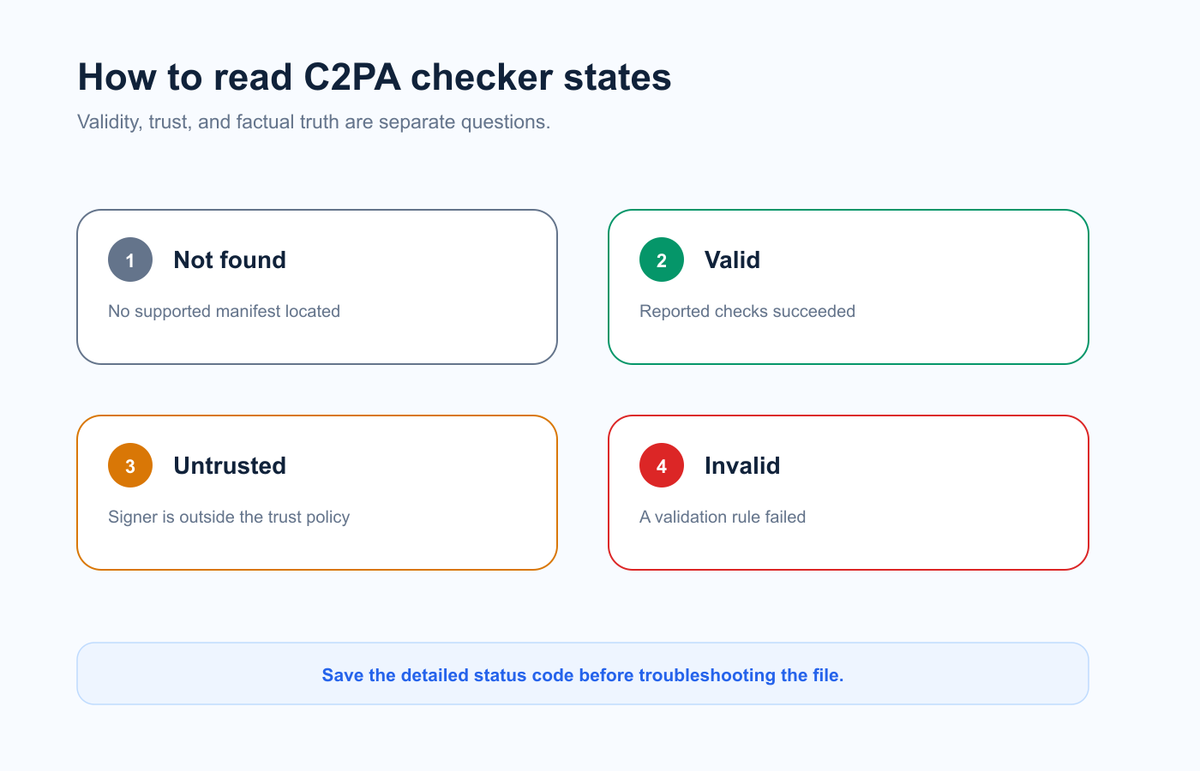
“No credentials” is absence of detected provenance, not proof of human creation.
Validity and trust are separate: a signature can validate while the signer remains untrusted.
An invalid result requires the specific validation code and file history to diagnose.
Preserve the original before screenshots, conversions, editors, or social platforms alter it.
EasyGlobe Team
Global Growth Team
EasyGlobe helps teams expand into global markets with practical SEO, localization, LLM optimization, paid advertising, and growth operations. We turn complex international growth work into clear systems, high-quality content, and measurable execution.
A C2PA checker result describes what happened while locating and validating Content Credentials. “No credentials” means the checker did not find a supported manifest in the uploaded file. “Untrusted” means a credential may be structurally valid but its signer is not trusted by the checker. “Invalid” means one or more validation checks failed. None of these labels alone tells you whether the depicted event is true.
Upload the best available original to the C2PA Checker, then use this guide to interpret the trust state without overclaiming.
What does each C2PA result mean?
C2PA uses signed manifests to carry provenance assertions about a media asset. A verifier checks that the manifest belongs to the asset, the signature and referenced data are intact, and the signing credential satisfies its trust rules.
Result shown to the user
Practical meaning
What it does not mean
No Content Credentials found
No supported embedded or discoverable manifest was located
The image is human-made or unedited
Credentials found / valid
The manifest passed the checks reported by this verifier
Every claim is factually true or the scene is authentic
Valid but untrusted
The structure or signature may validate, but the signer is not on the verifier's trust list
The file is necessarily malicious or fake
Invalid
A validation rule failed, such as a hash, signature, credential, or referenced assertion check
The entire visual content is automatically false
Inconclusive or unsupported
The tool could not fully evaluate the file, format, manifest, or remote resource
No provenance exists anywhere
The exact wording varies between tools. Record the detailed code and message rather than relying only on a colored badge.
Why does a checker say “No Content Credentials found”?
Validity, trust, and factual truth are separate questions.
The simplest explanation is that the file was never issued with a C2PA manifest. But several other paths lead to the same result:
A screenshot created a new file without the original embedded manifest.
An editor exported a flattened copy and did not preserve Content Credentials.
A social or messaging platform resized, recompressed, or stripped metadata.
The credential uses a remote manifest that the verifier cannot reach.
The file format or manifest version is not supported by the checker.
You received a thumbnail, preview, copy-and-paste image, or converted file instead of the original.
OpenAI explicitly notes that missing C2PA metadata does not rule out OpenAI generation because screenshots and other transformations can remove it. Treat “not found” as a request for a better file, not a verdict.
What is the difference between valid and trusted?
Validity asks whether cryptographic and structural checks succeed. Trust asks whether the verifier recognizes the signer or its certificate chain under the trust policy being used.
An organization can create a technically valid test credential with a certificate that is not on a public trust list. A verifier may therefore report a valid signature and an untrusted signer at the same time. That state is more informative than either “good” or “bad”: the signed data may be intact, but the verifier cannot establish the signer's accepted identity under its current policy.
Check these fields when available:
Claim generator or application name.
Signer and certificate information.
Trust-list status.
Issued and timestamp dates.
Actions or edits declared in the manifest.
Validation codes and affected assertions.
For a broader comparison with embedded watermarks, see C2PA vs SynthID.
Why can a C2PA manifest become invalid?
The C2PA specification defines detailed validation codes. Typical categories include a signature or signing credential problem, a mismatch between the asset and its hard binding, a missing or altered assertion, an inaccessible external resource, or an invalid timestamp.
Do not guess from the word “invalid.” Copy the specific status code. For example, a hash mismatch points to different troubleshooting steps from an untrusted signing certificate or inaccessible remote assertion.
The safest diagnostic sequence is:
Retest the same file in another standards-compatible verifier.
Confirm that the file completed downloading and is not a thumbnail.
Compare it with the creator's original export.
Record the complete validation code and manifest details.
Ask the issuing application or signer about unsupported or expired credentials.
Never repair, re-encode, or strip the file before preserving the version that produced the error.
Does a valid Content Credential prove an image is real?
No. A valid credential supports the integrity of the signed provenance statements. It can help answer who issued the manifest, which tools or actions were declared, and whether the signed relationship to the asset remains intact.
It does not independently prove that a photographed event happened, that a caption is accurate, that the creator owns all rights, or that no misleading edit occurred outside the recorded chain. Provenance is valuable because it makes claims inspectable; it is not an oracle for truth.
For an unknown file, combine C2PA with pixel analysis in the AI Image Detector, provider watermark checks, reverse-search evidence, and the earliest available source.
A practical C2PA troubleshooting workflow
Use this order to preserve the most information:
Keep the original. Work on a duplicate and calculate a hash if the review is sensitive.
Run the first C2PA check. Save the full result, not only the summary badge.
Classify the result. Separate not found, valid, untrusted, invalid, and unsupported states.
Follow the code. Investigate the exact certificate, timestamp, binding, assertion, or network error.
Compare another version. If possible, obtain the creator's original export and compare manifests.
Add other evidence. Use provider watermarks, pixel estimates, publication history, and source context.
State the narrow conclusion. Report what the credential supports and what remains unknown.
FAQ: C2PA checker results
Does “No Content Credentials” mean the image is real?
No. The image may never have contained a credential, or the credential may have been removed by a screenshot, conversion, editor, or platform.
Is an untrusted C2PA credential fake?
Not necessarily. It can mean the signer is absent from the verifier's trust list even though parts of the manifest validate. Inspect the signer and certificate details before interpreting it.
Can editing make C2PA invalid?
An edit outside a credential-aware workflow can break the signed relationship or produce a new file without the manifest. A credential-aware editor may instead add a new manifest describing the edit.
Why do two C2PA checkers show different results?
They may support different specification versions, formats, trust lists, remote resources, or user-facing status mappings. Compare their detailed codes rather than only the headline label.
Can I add Content Credentials back after they were removed?
A new credential can be issued for the current file by a compatible application, but it cannot recreate a missing history without evidence. It should describe the current signer and known actions honestly.