Use =B2*(1+B3/B4)^(B4*B5) for one starting amount.
Use =FV(B4/12,B5*12,-B3,-B2,0) for monthly deposits.
Lock input cells with dollar signs before copying formulas down.
Download the workbook and CSV templates from the article.
EasyGlobe Team
Global Growth Team
EasyGlobe helps teams expand into global markets with practical SEO, localization, LLM optimization, paid advertising, and growth operations. We turn complex international growth work into clear systems, high-quality content, and measurable execution.
I use Excel for compound interest when I want to see how money can grow over time without using a confusing calculator. In this guide, I will show the exact formulas I copy, the cell setup I use, and a free workbook template you can download. If you searched for "excel calculate compound interest templates formula copy," this is the simple version I would give you.
This is a spreadsheet and math guide, not personal financial advice. I am using simple sample numbers so the formulas are easy to understand.
Who This Excel Compound Interest Template Is For
I made this for students, parents, creators, and small business owners who want a quick Excel compound interest formula without learning finance words first. It works best when the interest rate stays the same in the example.
The workbook has three tabs: One-Time Investment, Monthly Contributions, and Formula Copy Schedule. The CSV is smaller and useful when you only want to paste a basic formula-copy table into Excel or Google Sheets.
How Do I Calculate Compound Interest In Excel?
I start with this math formula:
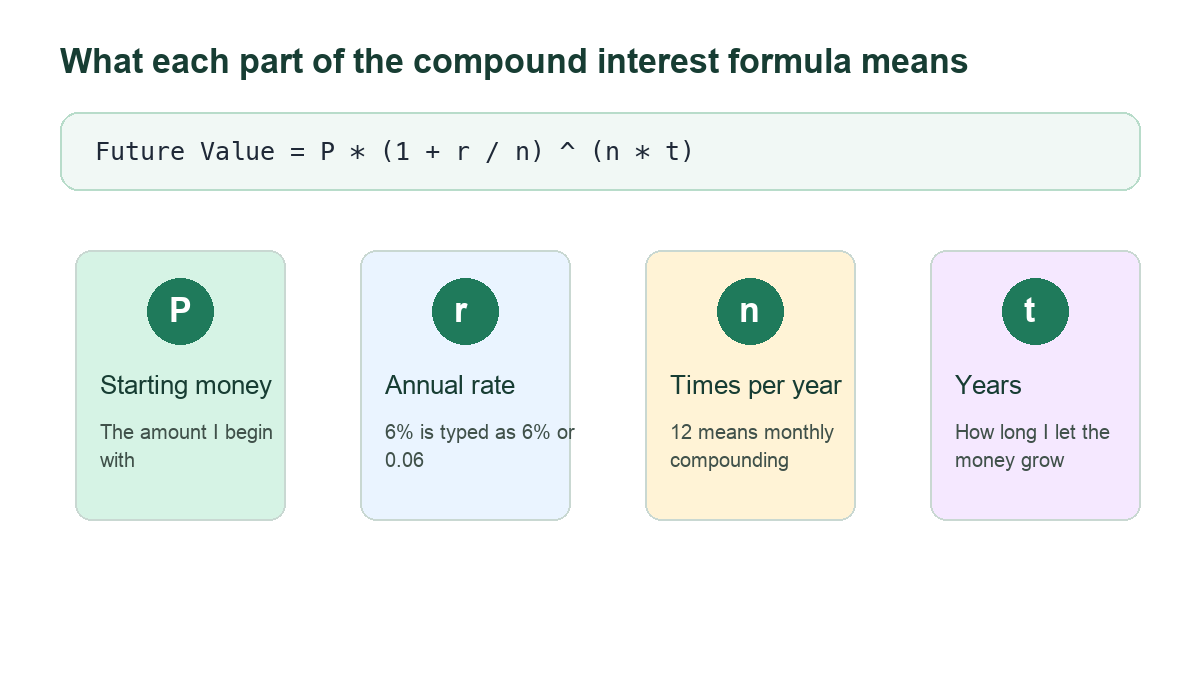
Future Value = P * (1 + r / n) ^ (n * t)
P means the starting money.
r means the yearly interest rate.
n means how many times interest is added each year.
t means the number of years.
The four parts of the compound interest formula in plain words.
For example, if I start with $10,000, use a 6% yearly rate, compound monthly, and wait 10 years, I use this formula:
=10000*(1+6%/12)^(12*10)
Excel returns about $18,193.97.
What Excel Cell Setup Should I Use?
I like this layout because it is easy to copy and check. Put the starting amount in B2, annual interest rate in B3, compounds per year in B4, years in B5, future value in B6, and interest earned in B7.
Then I put this formula in B6:
=B2*(1+B3/B4)^(B4*B5)
I put this formula in B7:
=B6-B2
That second formula shows only the interest earned. It subtracts my starting amount from the final amount.
How Do I Copy A Compound Interest Formula Down?
Sometimes I do not want one big formula. I want to see each month on its own row. This is where formula copy helps.
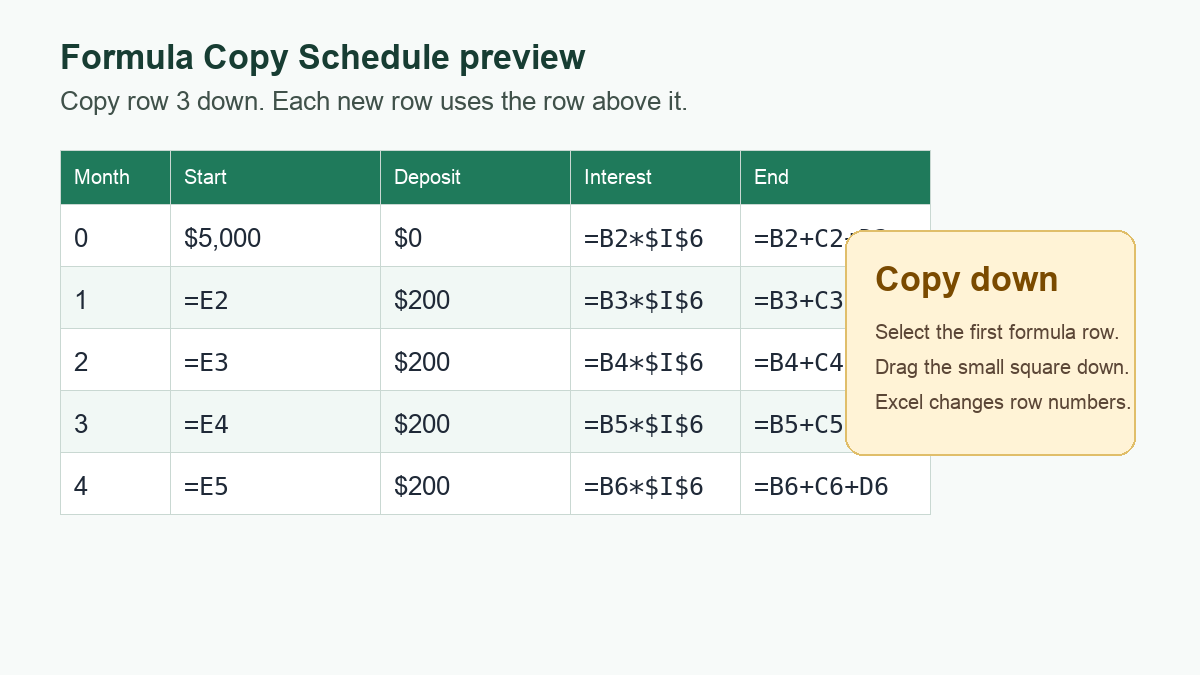
I use Month, Start Balance, Contribution, Interest, and End Balance columns. For row 2, I use month 0. This row holds my starting balance.
For row 3, I use these formulas:
A3: =A2+1
B3: =E2
C3: =$I$4
D3: =B3*$I$6
E3: =B3+C3+D3
Then I copy row 3 down for as many months as I need.
A formula-copy schedule lets each new row use the row above it.
The dollar signs in $I$4 and $I$6 are important. They lock those input cells, so Excel keeps pointing to the same monthly contribution and monthly rate when I copy the formula down.
How Do I Calculate Monthly Compound Interest In Excel?
When I add money every month, I can also use Excel's FV function.
My setup is: starting amount in B2, monthly contribution in B3, annual interest rate in B4, and years in B5.
Then I use this formula:
=FV(B4/12,B5*12,-B3,-B2,0)
This asks Excel to find the future value. The negative signs are not a typo. Excel uses signs to show money going out and money coming in. By making the starting amount and monthly contribution negative, the result shows as a positive final balance.
Microsoft's Excel help says the FV function calculates future value using a constant interest rate. Microsoft also shows compound interest examples with yearly, monthly, and other compounding periods.
Which Excel Compound Interest Formula Should I Use?
I choose the formula based on what I need.
One starting amount only: =B2*(1+B3/B4)^(B4*B5)
Monthly deposits: =FV(B4/12,B5*12,-B3,-B2,0)
Month-by-month table: copy formulas down each row
Interest earned only: Final Balance minus Starting Money minus Deposits
If I only need a quick answer, I use the one-line formula. If I want to check every month, I use the formula-copy schedule.
What Mistakes Should I Check?
I make sure 6% is not typed as 6 unless I really mean 600%.
I divide the yearly rate by 12 when the sheet is monthly.
I multiply years by 12 when the sheet counts months.
I lock input cells with dollar signs before copying formulas down.
I format money cells as currency so the sheet is easy to read.
A small mistake in the rate or time period can make the final number look very different.
Which Formulas Can I Copy?
Here are the formulas I copy most often:
One-time money: =B2*(1+B3/B4)^(B4*B5)
Interest earned: =B6-B2
Monthly deposits: =FV(B4/12,B5*12,-B3,-B2,0)
Monthly row interest: =B3*$I$6
Monthly row ending balance: =B3+C3+D3
FAQ
How do I calculate compound interest in Excel?
I use =B2*(1+B3/B4)^(B4*B5). In that setup, B2 is starting money, B3 is annual rate, B4 is compounds per year, and B5 is years.
How do I copy a compound interest formula down in Excel?
I put the monthly rate and monthly contribution in fixed input cells. Then I use dollar signs, like $I$6, so Excel keeps using the same input when I copy down.
What formula should I use for monthly deposits?
I use =FV(B4/12,B5*12,-B3,-B2,0). It works when the payment is the same every month and the rate is constant.
Why is my Excel FV answer negative?
Excel uses positive and negative signs to show cash direction. If the answer is negative, I usually add negative signs before the payment and starting amount, like -B3 and -B2.