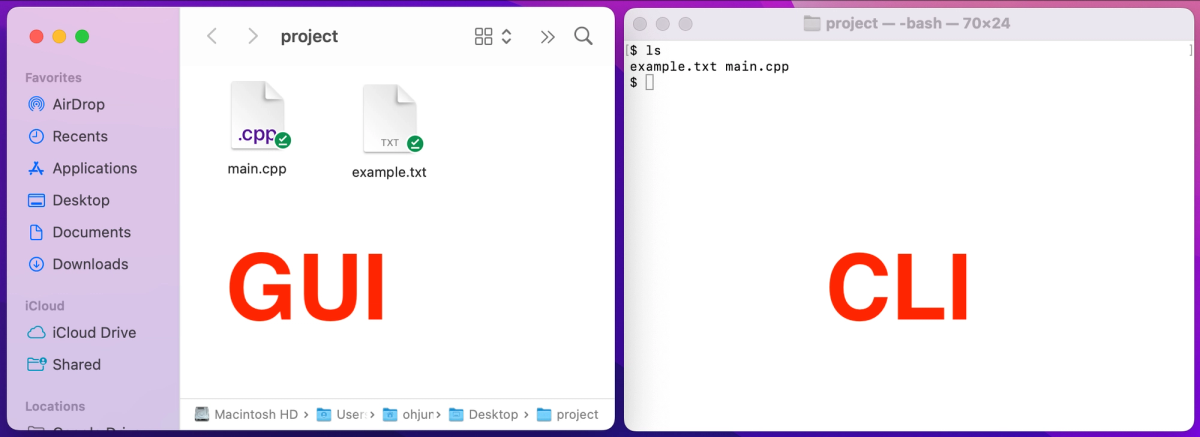
GUI-first software is often too fragile for agents because visual automation breaks on layout changes and noisy screenshots.
CLI-driven Agent-Native software keeps the power of real tools while giving agents structured commands and parseable output.
The practical opportunity is to wrap professional software assets with reliable command interfaces, tests, and quality checks.
EasyGlobe Team
Global Growth Team
EasyGlobe helps teams expand into global markets with practical SEO, localization, LLM optimization, paid advertising, and growth operations. We turn complex international growth work into clear systems, high-quality content, and measurable execution.
For the past few decades, almost all software was built for people. From GUI apps to modern websites, everything was designed for human eyes and mouse clicks.
But now tools like OpenClaw, Claude Code, and Cursor are changing the game. A new reality is here: in the near future, the biggest software users may be AI agents, not humans.
AI has a strong brain, but weak hands. When agents try to use real professional software through GUI, they become slow and fragile. The current common method is RPA: screenshot the screen, detect pixels, and click like a human. This often breaks. A tiny UI change can kill the whole workflow.
AI needs a native machine language to control software assets directly. That is why CLI-driven Agent-Native architecture is becoming so important.
Chapter 1: Fragile RPA and the Agent-Software Gap
Visual automation is fragile: popups, ads, and small layout changes can break everything.
No structured feedback: agents need clean data streams, not noisy screenshots.
Loss of professional power: replacing real tools with simple scripts often removes most advanced features.
We need a path that avoids GUI fragility but keeps 100% of real software power. This is the core idea behind CLI-Anything.
Chapter 2: Why CLI Is the Best Bridge
Light and universal: CLI works across platforms with low overhead.
Structured and predictable: commands can return JSON, which agents can parse safely.
Self-describing tools: --help acts like instant documentation for agents.
With one command, an agent can run a full flow: analyze code, plan architecture, test, and ship. The result is a powerful CLI layer with REPL and undo/redo behavior.
Chapter 3: Real Software Integration, No Compromise
The hard rule is simple: do not fake professional tools. Do not replace them with toy libraries.
For rich documents, call LibreOffice in headless mode.
For 3D scenes, drive the real Blender engine.
For audio, use real Audacity and sox backends.
The system does not trust 'exit 0' alone. It also checks output quality with file magic bytes, ZIP structure checks, and audio RMS checks. This strict setup passed 1,508 tests across 11 complex software tools.
Chapter 4: From Fragmented APIs to a Cleaner Digital Stack
This idea is not only for local open-source software. It also works for closed SaaS tools and large API systems. With docs and SDKs, models can wrap many loose endpoints into one coherent CLI command set. This is also why SEO workflows are moving toward more structured, machine-readable pipelines.
Then agents stop stitching raw API calls every time. They just run clean terminal commands. This improves reliability and also saves tokens.
Conclusion: The Agent-Native Future Has Started
Software serves humans today. Tomorrow, many core users will be agents.
As this ecosystem expands into CAD, DAW, IDE, and more, standards like SKILL.md can let agents discover and orchestrate tools automatically.
We are watching a major infrastructure shift. Decades of software assets are being repackaged for AI execution. The Agent-Native era is no longer a concept. It is already happening. If you want to apply this in your business, book a call.
GUIs are optimized for human eyes, not machine execution. A popup, renamed button, changed layout, or slow-loading screen can break an agent flow even when the underlying software still works.
Does Agent-Native software replace existing professional tools?
No. The stronger pattern is to keep the real tool and expose its capabilities through reliable commands, structured outputs, and verification checks so agents can operate it without losing professional features.
Why is CLI output better for agents?
CLI output can be deterministic, compact, and machine-readable. JSON responses, exit codes, logs, and artifact checks give agents clearer feedback than screenshots or visual guesses.
What should teams check before building CLI wrappers?
Start with repeatable workflows, stable inputs, clear error states, and tests that inspect the produced artifact. A wrapper is only useful if it preserves real tool capability and reports failure honestly.