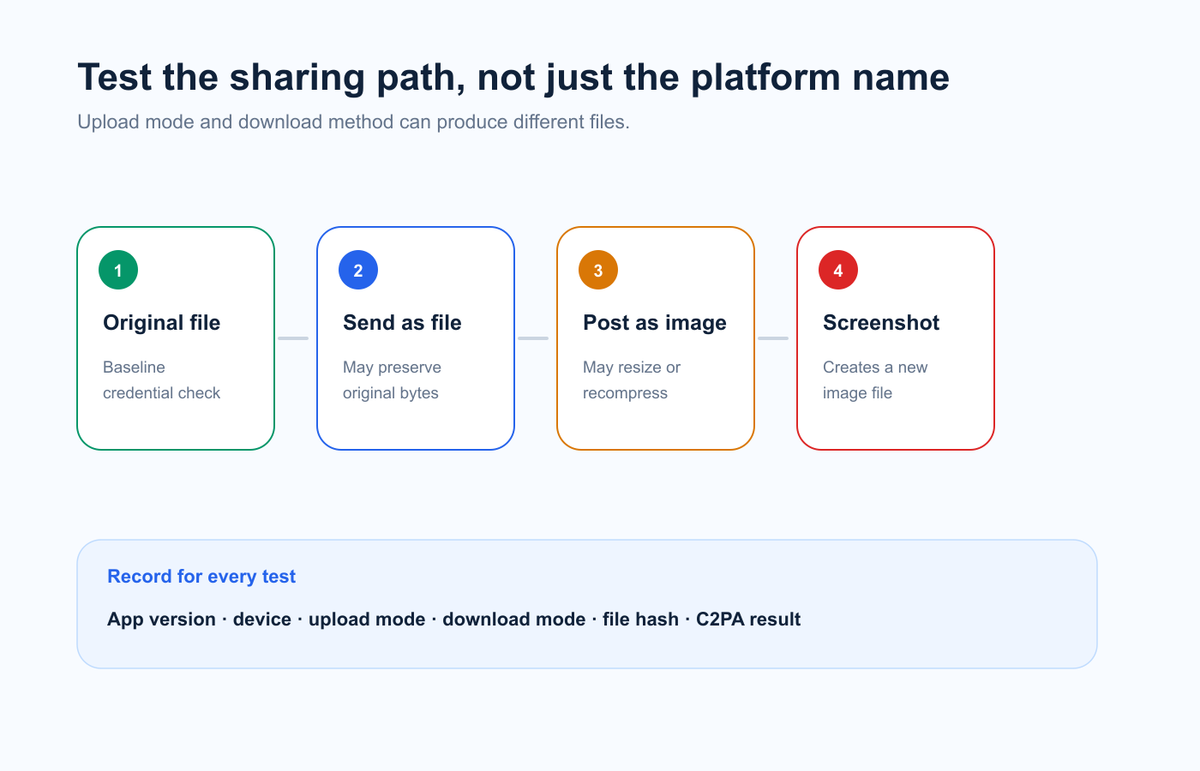
Preserve and verify the original before uploading it anywhere.
Direct file sharing, image posting, screenshots, and copy-and-paste are different technical paths.
Missing C2PA after download does not prove the original lacked credentials.
Platform-specific claims should include the app version, device, date, and exact workflow tested.
EasyGlobe Team
Global Growth Team
EasyGlobe helps teams expand into global markets with practical SEO, localization, LLM optimization, paid advertising, and growth operations. We turn complex international growth work into clear systems, high-quality content, and measurable execution.
Social-media and messaging workflows can remove C2PA metadata when they resize, recompress, convert, or rebuild an uploaded image. A screenshot almost always creates a new file without the original embedded manifest. Platform behavior can change by app, device, upload path, and download method, so the reliable answer is to test the exact sharing path with a known credentialed original.
Use the C2PA Checker before and after sharing to see whether Content Credentials survived.
Why can sharing remove Content Credentials?
C2PA manifests can be embedded in a media file or discovered through supported external mechanisms. Many consumer platforms optimize media for speed, privacy, display consistency, and storage. Their processing pipeline may decode the image and create a new derivative with different dimensions, quality, format, color profile, or metadata.
If the new file is not produced by a C2PA-aware workflow that preserves or updates provenance, the downloaded derivative may no longer contain the original manifest. OpenAI's own guidance warns that metadata can be removed accidentally or intentionally and that screenshots can remove C2PA.
This does not mean every platform always strips every credential. Some services show platform-level AI labels, preserve metadata in specific file-sharing modes, or participate in content-authenticity systems. The exact path matters more than the platform name alone.
Which sharing actions are most likely to change C2PA?
Test the exact upload and download path instead of assuming permanent platform behavior.
The following table is a risk guide, not a permanent platform test result.
Sharing path
What usually happens technically
C2PA preservation risk
Send as an original document or file
Original bytes may be transferred without image rendering
Lower, but verify the downloaded file
Post as an image
Platform may resize, recompress, convert, or rebuild it
High
Take a screenshot
Operating system creates a new image of displayed pixels
Very high
Copy and paste from a browser or app
Clipboard may provide a rendered bitmap or converted format
High
Download a thumbnail or preview
A derivative file is saved instead of the original
Very high
Share a cloud-storage link
Recipient may download the original object
Lower if the link serves original bytes
“Lower” does not mean guaranteed. Privacy filtering, virus scanning, export settings, and recipient-side saving can still alter a file.
How to test a social platform without making unsupported claims
Use one credentialed image and change one variable at a time.
Verify the original. Save the C2PA result, filename, size, dimensions, format, and file hash.
Choose one path. For example, upload as an image post from a specific app version on a specific device.
Download the result. Record whether you used a platform download button, browser save, screenshot, or recipient export.
Compare the files. Check hash, dimensions, format, file size, EXIF, and C2PA result.
Repeat once. Confirm the result with another account or device when the conclusion matters.
Report precisely. State the platform, app version, operating system, date, upload mode, and download mode.
Avoid broad statements such as “Platform X supports C2PA” based on a badge displayed in the app. A platform may read the original credential for its own label while still serving a downloaded derivative without the embedded manifest.
A screenshot normally captures rendered pixels and creates a new image. It does not copy the original file container byte for byte, so embedded C2PA, EXIF, and other metadata usually do not travel into the screenshot.
The screenshot can still show visible Content Credentials icons or labels that were on screen, but those visible pixels are not cryptographic credentials. Anyone can reproduce a visual badge. Verify the file itself.
An invisible watermark such as SynthID is a separate signal embedded into media content rather than ordinary metadata. Google says SynthID is designed to withstand common transformations including cropping and lossy compression. Detection after a screenshot is still not guaranteed and requires a compatible provider verifier.
What does “No Content Credentials” mean after download?
It means the checker did not find a supported credential in that downloaded file. It does not establish whether the uploader's original contained one.
Ask for the original file or a direct file-transfer link. Then compare:
Original verifies, downloaded copy does not: the sharing path likely removed or disconnected the credential.
Neither file verifies: the source may never have had C2PA, or both files may be transformed copies.
Both verify with the same history: the tested path preserved the usable credential.
Downloaded copy has a new credential: inspect who signed it and what actions it declares.
How can creators preserve provenance while publishing?
Keep an archival original with intact credentials and publish a verifiable download when provenance matters. If the social platform transforms media, link to an original file, portfolio page, newsroom asset page, or content-authenticity record that recipients can inspect.
Creators should also document export settings and use credential-aware editing tools where possible. A C2PA-aware edit can add a new manifest describing the action instead of silently breaking the old relationship.
For publishers, visible labels should complement—not replace—file-level verification. Explain what the label means, name the signer, and give readers a route to inspect the credential.
FAQ: social media and C2PA metadata
Does Instagram remove C2PA metadata?
Do not rely on a timeless yes-or-no answer. Test the current app, device, upload mode, and download method. Image posting commonly creates derivatives, while platform labeling and file preservation are separate questions.
Does WhatsApp preserve Content Credentials?
Sending as a document and sending as a photo can use different processing paths. Verify the recipient's downloaded file from the exact mode you intend to use.
Does copying an image preserve C2PA?
Often not. Copy-and-paste may transfer a rendered bitmap or converted file rather than the original bytes. Use an original-file download when provenance matters.
Can SynthID survive when C2PA is removed?
Possibly. SynthID is embedded into the media signal and is designed for more resilience than ordinary metadata, but detection depends on the provider, transformation, and compatible verifier.
Is a visible Content Credentials icon enough?
No. The icon is a user-interface signal. Inspect the underlying credential, signer, actions, and validation status in a compatible verifier.